Saturday, October 1, 2011

Sketchup-Daytime Vray exterior Setting

For me, creating a modern minimalist buildings using sketchup is fun and very fast, and it also helps me to develop the concept that I have in my head. But there is one thing that I still don't like from sketchup is the trees. I still haven't found any tree model that is realistic enough for my scene. And when I found some that a little bit realistic, the tree file would be so big that it actually scares my computer :P

Therefore, I'd rather use photoshop to add tree elements to my presentation. But maybe you have found a good sketchup vray tree model? Please, let me know, it would be really helpful.

For this tutorial, the rendering result is still raw, without any photoshop touch up. And the street lamp is still horribly fake. But for your own scene you can find a better one.


In the video, I'm also going to explain a little bit about vray displacement to help me created a more realistic grass and water. You can also use this displacement for creating a rug, cushion, etc. But one thing you have to remember, if you use a lot of displacement, your rendering time will be a lot longer.

Here is the tutorial as you can see on YouTube

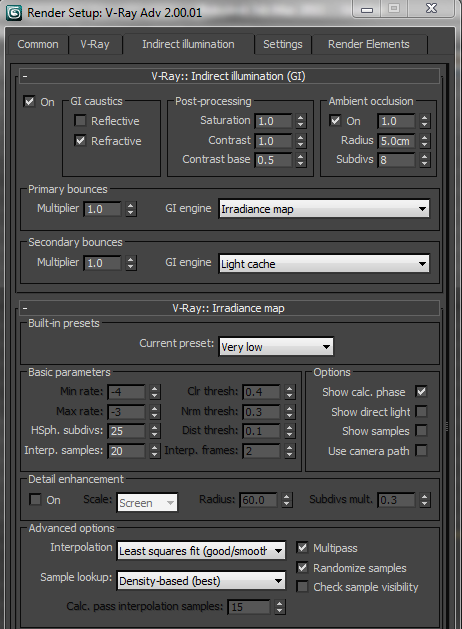
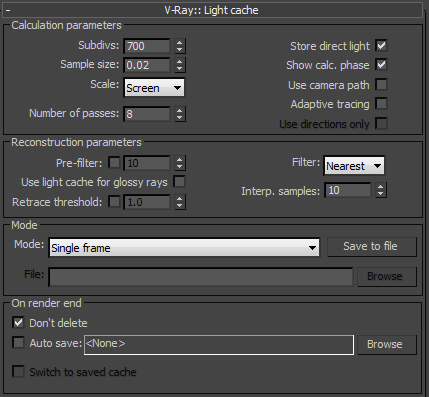
And these are the Vray parameter that I'm going to use :


Have a nice time learning!

Wednesday, September 14, 2011

Max-Vray Light and Camera Setting for Interior

I must admit, Vray is my most favorite rendering engine right now, both for 3dsMax and Sketchup. And for me, once you understand Vray parameter setting for 3dsMax, it's really easy to apply it to Sketchup's Vray. Also the other way around.

At the beginning, you might feel Vray is too complex since there's a lot of parameter that you need to adjust not to mention Vray has it's own texture that you need to master to gain maximum result. But it's really worth all the work. 

Interior Scene using Vray

Here's my youtube tutorial for this room's lighting and camera

These are the setting Vray Interior scene with medium quality result, like the above picture (Click to enlarge it):


Monday, September 12, 2011

Max-Arch Animation 105-A Simple Car Animation

Cars can enhance our Architecture presentation, it also can help us explain our building's scale to our client. Therefore I feel that I need to add this Car animation to our Architectural animation series.

This car animation will be very simple, and the car movement will be just linear, since the car won't be the focus of our presentation. The controller would be dummies which linked with the car using Look at constraint, Position Constraint, Orientation Constraint and Path constraint.

There are something that you have to consider when animating the car :
  1. Pivot point direction. Since we're going to use link, the pivot point direction can be affected by the parent link.
  2. Hierarchy. Some controller have stronger impact than other controller. For example, If you use Look At constraint before using Link, the object won't be affected. Because Link will lock the controller that's used before.
  3. When using Orientation Constrain, pay attention to the Transform Rule, whether it's using Local or World. If it's using World, it would also lock some of the constraint controller that's used before.


Of course there are a lot more realistic ways to animate a car, using reactor for example, but that's for another time, another tutorial.

Good luck!

Thursday, August 25, 2011

Sketchup-Cool Section Animation

I'm using 3dsmax, long before I even learned sketchup. Initially I felt no need to master sketchup, because the presentation with 3dsmax (in my opinion) much more impressive, more people ask for it and has more widespread implementation. But there is one feature Sketchup that makes me so very interested to learn Sketchup. And that is the Section. A feature that's available in Sketchup Pro

Of course 3dsMax has Clip which function a bit similar to section. but section can be directly used for various things. It can be directly exported to AutoCAD for further editing, or can be presented with the feature layout (which is now also a step forward again), and the most impressive, in my opinion, is the Section can be directly animated.

When I first saw the section animation, I thought, surely this would be very difficult. But, now that I know the tricks, it's really easy! Unfortunately, when creating this tutorial, Section still can't be rendered using Vray. And I have not tried any other rendering engine. Otherwise, it would be really cool!!


Good luck!

Tuesday, August 23, 2011

Sketchup-Export to AutoCAD with layer


Usually, when we export Skechup files to Autocad, either 2d or 3d, the result will be in monochrome lines. So it would be rather difficult to separate those lines into different layers, for example walls, furniture, doors and so on. It can be done of course, but I would take a long time.

In this tutorial, I will show you an easier way. Basically, i just separate the layers in sketchup drawing, and then export those layer color to Autocad. And after that, i change each color to individual layers in CAD. Complicated? naah, you'll see.

I've also have explained how to make layer in  tutorial 3 follow me and layer


Good luck!